BibleProject — 10 Commandments Client: BibleProject (via Whiteboard) Technologies: Webflow CMS, JavaScript, GSAP, Lottie, Mux, CSS Grid
The Problem
BibleProject was launching a serialized, multi-week campaign to help audiences rediscover the Ten Commandments as wisdom literature. The experience needed a digital home that could anchor the full lifecycle of the campaign — weekly content releases, deep engagement beyond social and video platforms, and an invitation to sustained reflection.
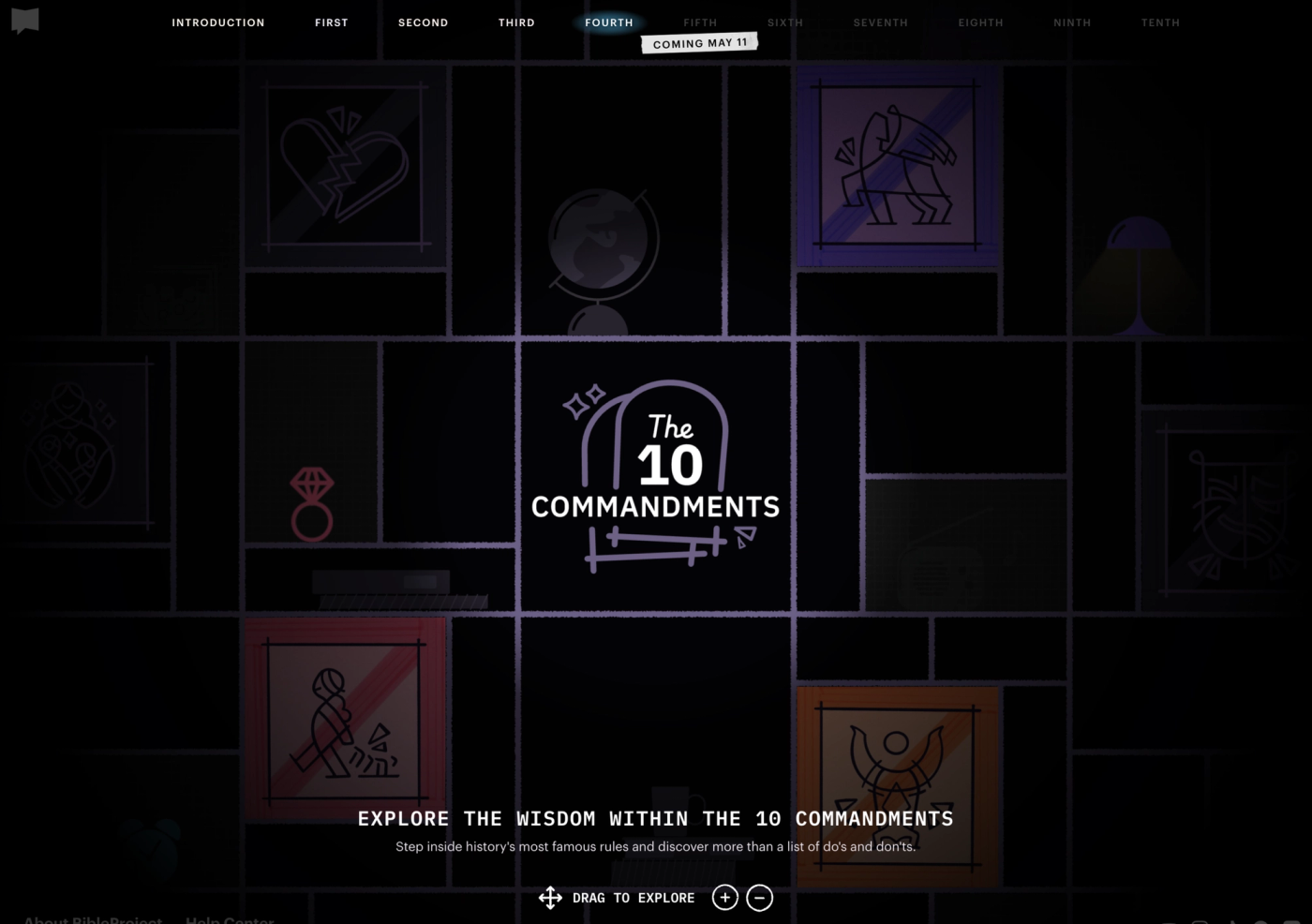
The design Whiteboard delivered was ambitious: an interactive canvas where users could explore commandments and wisdom content spatially, not just scroll through it. The challenge was building something that felt like a crafted native app experience rather than a webpage, on a tight three-week development timeline.
My Approach
Coming into an established design system with a hard launch date meant moving fast without cutting corners on quality. I built from Whiteboard's design handoff, working through internal QA before delivering to BibleProject for final review.
Key Solutions & Features
Interactive Draggable Canvas
The centerpiece of the experience is a spatial canvas of commandments and wisdom items that users can freely pan, zoom, and explore. Under the hood, a single camera object tracks x, y, and scale state — GSAP's ticker applies those values to the DOM only when something has actually changed, keeping the render loop efficient. GSAP's Draggable handles panning with inertia, edge resistance, and bounds clamping that recalculates dynamically as the zoom level changes.
Zoom works across all input methods: pinch-to-zoom on touch, cmd/ctrl+wheel on desktop, and stepped zoom buttons. Each method feeds into the same focal-point zoom logic, so the canvas always scales toward the right point regardless of how the user is interacting. On touch, Draggable is temporarily disabled during pinch gestures to prevent conflicts, then re-enabled once the spring-back animation settles — with synthetic pointer events dispatched to reset Draggable's internal state so the next tap registers immediately.
Content on the canvas fades out when dragging starts and eases back in after the user settles — a small detail that keeps the interface feeling intentional rather than just functional.
CMS-Driven Weekly Releases
Each commandment and wisdom item is positioned on the canvas via CSS grid areas driven by data- attributes, with placement defined in the CMS. Items not yet released are visually dimmed, communicating the serialized campaign schedule without hiding content. BibleProject's team could publish new items on schedule without any developer involvement.
Lottie Animation Optimization
The design called for flipbook-style Lottie animations — candle and lamp sequences built from over 150 embedded PNG frames at 100fps. Getting these to perform well required real optimization work: converting embedded frames to WebP, tuning compression, and evaluating frame reduction strategies to bring file sizes down without degrading the visual quality.
Mux Video Integration
Video is core to BibleProject's content. Mux handled delivery, giving the team a performant alternative to YouTube or Vimeo that fit the premium feel of the design.
Project Highlights
- GSAP-powered draggable canvas with inertia, pinch zoom, wheel zoom, and spring-back bounds
- Unified focal-point zoom across mouse, trackpad, touch, and button inputs
- CMS-driven content release system with per-item scheduling
- Lottie flipbook optimization
- Mux video integration